Krups EA876 Stuck Brewing Unit: Easy Fix Guide
Troubleshooting a stuck brewing unit on your Krups EA876 often involves power cycling, checking for obstructions, and ensuring proper component alignment.
There’s nothing quite as frustrating as waking up ready for that perfect cup of coffee only to find your trusty Krups EA876 espresso machine's brewing unit stubbornly refusing to move. As someone who's spent countless hours brewing, cleaning, and occasionally coaxing these sophisticated machines back to life, I understand the panic. This guide will walk you through the precise steps to diagnose and resolve a stuck brewing unit issue, helping you get back to enjoying your favorite brew without unnecessary hassle. We'll dive deep into common culprits and effective solutions, ensuring your Krups EA876 operates smoothly.

Understanding Your Krups EA876 Brewing Unit
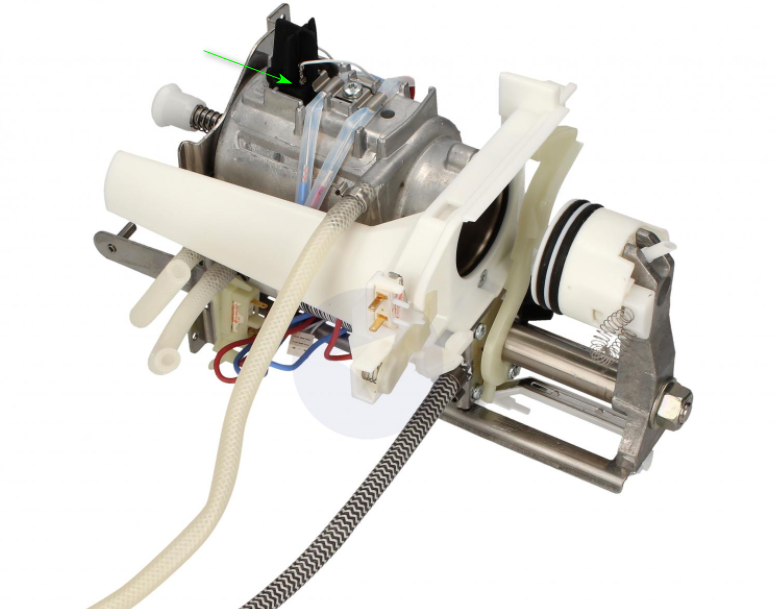
The brewing unit is the heart of your Krups EA876, responsible for compressing coffee grounds, infusing them with hot water, and extracting that delicious espresso. It’s a complex mechanical component that moves through several cycles during each brew, from grinding to tamping to extraction and puck ejection. When this vital part gets stuck, it usually indicates a disruption in its intricate movement path, often due to an accumulation of coffee grounds, a misalignment, or an electronic hiccup. Understanding its role helps in pinpointing why your Krups EA876 might be having a moment.
Initial Steps: The Basics of Troubleshooting
Before delving into more complex solutions, it's always wise to start with the simplest checks. These initial steps often resolve many issues with a stuck Krups EA876 brewing unit and can save you a lot of time and effort. From my experience, about half of all "stuck" problems can be fixed with these fundamental actions.
-
Perform a Power Cycle:
- Unplug your Krups EA876 from the power outlet.
- Wait for at least 60 seconds. This allows the internal electronics to fully reset.
- Plug the machine back in.
- Turn it on and observe if the brewing unit attempts to self-adjust or move into its home position. This often clears minor software glitches that might cause the Krups EA876 to get stuck.
-
Check for Obvious Obstructions:
- Carefully open the service door where the brewing unit is located.
- Using a flashlight, visually inspect the area around the brewing unit. Look for stray coffee grounds, broken bean fragments, or any foreign objects that might be jamming the mechanism.
- Sometimes, an errant coffee puck might not have ejected properly, or excess grounds can solidify and impede movement.
-
Ensure Proper Installation of Components:
- Remove and reinsert the water tank firmly, ensuring it clicks into place. A poorly seated water tank can prevent the machine from starting or cause error messages on your Krups EA876.
- Remove and reinsert the drip tray and coffee grounds container. These components have sensors, and if they aren't correctly aligned, the machine's safety mechanisms might prevent the brewing unit from moving. Make sure they are pushed all the way in.

Common Causes and Their Solutions
Once you've tried the basic troubleshooting, if your Krups EA876's brewing unit is still stuck, it's time to explore specific common causes. Each issue typically has a straightforward solution that you can implement yourself.
Excess Coffee Grounds/Clogging
When using your Krups EA876 regularly, fine coffee particles can build up in the brewing unit's delicate mechanisms. Over time, these grounds can compact and create resistance, causing the brewing unit to seize up. It's a bit like sand in a finely tuned clockwork.
- Solution: Turn off and unplug your machine. Carefully access the brewing unit compartment. Use a small brush (like a toothbrush or a specialized coffee machine brush) and a soft cloth to gently clean away any visible coffee grounds from around the brewing unit's moving parts and tracks. A small handheld vacuum cleaner can also be very effective for removing stubborn, dry grounds from hard-to-reach areas within your Krups EA876.
Insufficient Lubrication
The brewing unit on your Krups EA876 has several moving plastic and metal parts that require smooth operation. Over time, the food-grade silicone grease applied during manufacturing can wear off or dry out, leading to increased friction. This friction can make the brewing unit struggle to move, eventually causing it to get stuck.
- Solution: After thoroughly cleaning, apply a thin layer of food-grade silicone grease (specifically designed for coffee machines) to the moving parts of the brewing unit. Focus on the guide rails and any visible O-rings or sliding components. Do not use petroleum-based lubricants, as these can damage plastic parts and are unsafe for food contact.
Water Tank or Drip Tray Misalignment
Your Krups EA876 is designed with safety features that prevent operation if certain components aren't correctly seated. If the water tank or drip tray is not fully inserted or is slightly askew, the machine's internal sensors might prevent the brewing unit from moving, interpreting it as an unsafe condition.
- Solution: Completely remove both the water tank and the drip tray/coffee grounds container. Take a moment to inspect them for any damage or debris. Then, reinsert them firmly, ensuring they click securely into their respective positions. Sometimes, a gentle push is all that's needed to align these components correctly on your Krups EA876.
Accumulated Limescale
Hard water contains minerals that can deposit as limescale within your Krups EA876's internal water systems and even affect the movement of mechanical parts. While typically affecting water flow, significant limescale buildup can also contribute to the overall stiffness or jamming of components, especially if it gets into moving joints.
- Solution: Perform a descaling cycle using a descaling solution specifically recommended for Krups machines. Follow the instructions in your Krups EA876 user manual precisely. Regular descaling is crucial not just for preventing clogs but also for ensuring the longevity and smooth operation of all internal components.
Software Glitch/Error Code
Sometimes, the issue isn't mechanical but electronic. A momentary power fluctuation, an interrupted brewing cycle, or a sensor misreading can cause the internal software of your Krups EA876 to lock up, preventing the brewing unit from moving. This might manifest as an error code on the display.
- Solution: First, try the power cycle mentioned earlier. If an error code is displayed (e.g., "Error 04" or "Error 05" which often relates to the brewing unit not being able to move), consult your Krups EA876 user manual. The manual provides specific meanings for error codes and recommended troubleshooting steps. Often, a complete reset or a specific sequence of button presses can clear the error.

Advanced Troubleshooting Techniques
If the basic and common solutions haven't resolved the stuck brewing unit on your Krups EA876, it might be time to consider some more advanced steps. These require a bit more care and attention, but can still be managed by the average user.
Manual Intervention (Careful!)
In some cases, the brewing unit might just be slightly off its track or caught on a stubborn bit of coffee, requiring a very gentle nudge. This is where patience and a light touch are key.
- Solution: With the machine unplugged and the service door open, try to gently wiggle the brewing unit. Don't force it. Feel for any resistance. Sometimes, a very slight pressure or a rotational wiggle can dislodge whatever is causing it to stick. I once had a situation where a Krups EA876 was refusing to budge, and after checking everything, a soft, encouraging push on one side of the brewing unit while observing the other side helped it realign and move freely again. This is a last resort before professional help, so proceed with extreme caution to avoid damaging delicate plastic parts.
Inspecting for Damaged Parts
If the brewing unit still won't move, it's possible that a physical component has broken or warped. This is less common but can happen over time or with heavy use.
- Solution: Carefully inspect the brewing unit itself for any visible cracks, bent plastic pieces, or signs of unusual wear. Look at the gears, guide rails, and attachment points. If you spot any clear damage, it's generally best not to attempt a DIY repair beyond this point. Trying to force a broken part can lead to more extensive and costly damage to your Krups EA876. At this stage, contacting Krups customer support or a certified repair technician is the safest and most effective next step. They have the specialized tools and parts to handle such repairs for your Krups EA876.
The Importance of Regular Maintenance
Preventative maintenance is your best defense against a stuck brewing unit. A well-maintained Krups EA876 is a happy Krups EA876.
- Solution: Establish a routine:
- Daily: Empty and rinse the drip tray and coffee grounds container. Wipe down the external surfaces.
- Weekly: Remove and thoroughly rinse the brewing unit under lukewarm water. Allow it to air dry completely before reinserting. Clean the brewing unit compartment with a brush and cloth.
- Monthly/Bi-monthly: Apply food-grade silicone grease to the brewing unit's moving parts.
- As prompted by the machine (or every 2-3 months): Descale your Krups EA876. Using filtered water can also significantly reduce the frequency of descaling. Consistent care prevents the small issues from becoming big problems, ensuring your Krups EA876 delivers delicious coffee for years.
Preventive Measures to Avoid a Stuck Brewing Unit
Prevention is always better than cure, especially when it comes to the intricate mechanics of your Krups EA876. By adopting a few simple habits, you can significantly reduce the likelihood of encountering a stuck brewing unit in the future.
-
Consistent Cleaning: Make it a habit to regularly clean the brewing unit and its compartment. Daily rinsing of the brewing unit (if removable) and weekly wiping down of the interior can prevent coffee grounds from accumulating and hardening. This is perhaps the single most impactful step you can take to keep your Krups EA876 running smoothly.
-
Regular Descaling: Follow your Krups EA876's recommended descaling schedule. Limescale can affect more than just water flow; it can indirectly cause stiffness in components and contribute to mechanical issues over time. Using filtered water can also extend the period between descaling cycles.
-
Using Appropriate Coffee Beans/Grind Size: While the Krups EA876 has an integrated grinder, using very oily beans can lead to residue buildup, and an incorrect grind setting (too fine for the machine's default) can produce excessive fines that clog the brewing unit. Stick to high-quality, medium-roast beans and ensure your grind setting is appropriate as per the manual.
-
Proper Reassembly After Cleaning: Always ensure that the brewing unit, water tank, and drip tray are correctly and firmly reinserted after cleaning or maintenance. Any misalignment can trigger safety sensors, preventing the Krups EA876 from operating and potentially causing the brewing unit to get stuck. Double-check that all components click into place.

Frequently Asked Questions about Your Krups EA876
What does an "error 04" or "error 05" mean on my Krups EA876?
"Error 04" or "Error 05" on your Krups EA876 typically indicates an issue with the brewing unit's movement or positioning, suggesting it is stuck or unable to reach its home position. Often, a power cycle or checking for obstructions can resolve these errors.
How often should I descale my Krups EA876?
You should descale your Krups EA876 every 2-3 months, or whenever the machine prompts you to do so, depending on your water hardness and usage frequency. Regular descaling is crucial for maintaining performance and preventing internal blockages.
Can I use any lubricant on the brewing unit?
No, you must only use food-grade silicone grease specifically designed for coffee machines on your Krups EA876's brewing unit. Other lubricants can damage plastic components, be unsafe for food contact, or negatively impact coffee flavor.
What if my Krups EA876 still says the brewing unit is stuck after I've tried everything?
If your Krups EA876's brewing unit remains stuck after trying all troubleshooting steps, it's best to contact Krups customer support or a certified service technician. There might be an internal mechanical failure or electronic issue requiring professional diagnosis and repair.
Is it normal for the brewing unit to make noise when moving?
Yes, it is normal for the brewing unit in your Krups EA876 to make some mechanical noise as it moves and processes coffee during brewing cycles. However, excessively loud grinding, squeaking, or straining noises could indicate a need for cleaning, lubrication, or inspection for obstructions.
Conclusion
Successfully troubleshooting a stuck brewing unit on your Krups EA876 often comes down to a systematic approach, starting with the basics and moving to more specific solutions. By understanding the machine's mechanics and applying these practical steps, you can typically resolve most issues yourself, ensuring your morning ritual isn't disrupted for long. Remember, consistent cleaning and proper maintenance are your best allies in keeping your espresso machine in top working order.
Don't let a stuck brewing unit deter you from enjoying fantastic coffee. Take a moment to apply these tips, and if you have other troubleshooting triumphs or tips for your Krups EA876, please share them below – your experience could help another coffee lover!